


Angel Eye Mobile
4.2807.00 Reviews
App Specs
- Version
- 5.13.1
- Updated On
- License
- Free
- Downloads
- 100,000+
- Developer
- AngelEye Health
- Categories
- Medical
- Platform
- Android
Screenshots
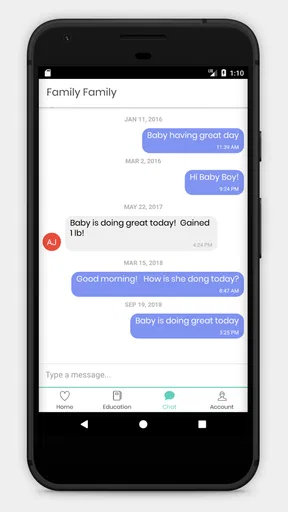
 Analysis by AppCompare
Angel Eye Mobile is a medical app from AngelEye Health, and I see it as a very specific communication tool rather than a general health tracker. It forms part of the Angel Eye Camera Systems Communication Platform, so its value depends on the care environment around it. That distinction matters: this is not an app I would install for symptom logging, medication reminders, or independent diagnosis. I would consider it when a family needs a clearer connection with a clinical camera system and the care team using it.
After spending time with it, my main impression is that the app is built around reassurance and access to information, not entertainment or self-management. Its free price removes one obvious barrier, and the Teen content rating makes it suitable for a broad family audience, although the medical setting still means that younger users should have an adult explain what they are seeing. The experience is most useful when it complements professional care rather than trying to replace a conversation with clinicians.
How Angel Eye Mobile works for different users and situations
I find that Angel Eye Mobile makes the most sense when people have different needs but share one care situation: one person may want a quick check-in, while another needs more explanation before using a medical communication tool. I would agree on who is responsible for checking and how to raise questions with staff, so access supports the family rather than leaving everyone to interpret updates alone. That practical division of roles also helps clarify when the app is useful—and when a different route is better.
Readability and navigation in a stressful medical context
The most important accessibility question here is not whether the app has a long list of options. It is whether a worried parent or family member can understand the purpose of the screen without having to learn a complicated system first. In my view, a focused communication app has an advantage over a crowded medical dashboard: there are fewer unrelated tasks competing for attention. That can make the first interaction less intimidating, especially for someone using a hospital-connected service for the first time.
Still, simplicity should not be confused with universal clarity. Medical communication often includes unfamiliar terms, camera-related status information, and messages whose meaning depends on the clinical situation. A person who is tired, distressed, or unfamiliar with hospital technology may need staff guidance before the interface feels natural. I would not judge the app only by how quickly I could open it in a calm room; the real test is whether its labels remain understandable when someone is checking in between updates and trying to absorb important information.
For better readability, I would use the phone’s own display settings where appropriate, such as larger text or increased contrast, and then check whether the layout still keeps essential controls visible. That is a practical step for anyone with reduced vision, age-related difficulty reading small text, or temporary eye strain. It is also worth holding the device at a comfortable distance instead of assuming that the default presentation works equally well for every reader.
One useful habit is to establish a simple routine: open the app, identify the current communication or camera area, read the latest information slowly, and close it when finished. This avoids repeatedly searching through the interface while distracted. If several relatives share responsibility, agreeing on the same routine can reduce confusion about who has checked for updates and what still needs to be discussed with the care team.
Worth Reading Before You Choose

EA SPORTS FC Mobile 26 Is a Bigger Football Game, but It Takes Time

Flipboard Shows What News Apps Must Do Beyond the Feed

Switching to Android Auto Means Rethinking Your Driving Routine

Google Calendar Makes a Crowded Week Easier to Manage

Ludo King Makes the Most of the Minutes Between Plans

Baby Panda World Brings Quick Play to Modern Phones, but Its Game Library Feels Busy
The app’s average rating is 4.2 from around 2.5 thousand ratings, which suggests that many users find the overall experience worthwhile, but a rating cannot tell me whether it suits a particular disability or hospital workflow. I would treat that public response as a useful signal of general satisfaction, not as proof that every navigation or readability need has been addressed.
Motor and sensory considerations
People using a medical communication app may not have their usual dexterity. A parent could be holding a bag, supporting a child, wearing gloves, or operating a phone with one hand. Someone recovering from illness may have tremors, fatigue, or reduced precision. In those situations, an app is easier to live with when it does not require rapid gestures or repeated tiny taps. My practical advice is to test the main task before an urgent moment: can you reach the relevant screen with one hand, and can you tell whether your tap worked?
I would also avoid relying on sound alone. Hospital rooms, waiting areas, public transport, and quiet homes all create different listening conditions. A user with hearing loss may need visual confirmation rather than an audible cue, while a user with sensory sensitivity may prefer to keep notification sounds restrained. Because the app is connected to a care communication setting, families should agree on how they will notice important updates without turning the phone into a constant source of noise or anxiety.
Reduced vision creates a different challenge. A larger system font can help, but it may also cause text to wrap or controls to move. I recommend changing one display setting at a time and then checking the complete path from opening the app to viewing the information that matters. If a relative has low vision, it is sensible to let that person choose the device and display arrangement that feels most comfortable instead of assuming the newest phone is automatically the easiest one to use.
For users with cognitive or attention-related needs, predictability matters. A short written note describing what the app is for, who to contact when something is unclear, and which information should not be interpreted without clinical advice can prevent accidental overreliance. That is not a criticism unique to this product; it is a necessary safeguard whenever a digital view sits alongside medical care. The app can support communication, but it should not force a family member to decide what a clinical change means.
One trade-off is that a specialist communication platform may be more focused than a broad accessibility-oriented health app, but it may offer fewer tools for independently adapting a complete care routine. Someone looking for voice-driven journaling, detailed symptom entry, medication accessibility, or a personal health record may find a conventional health app more suitable. Angel Eye Mobile makes more sense when the connected camera and communication purpose are central.
Situational access for families and caregivers
The strongest use case I can imagine is a family member who cannot remain beside a patient continuously but still needs a practical way to stay connected through the Angel Eye Camera Systems Communication Platform. In that situation, the mobile format can reduce dependence on being physically present at one particular screen. A relative might check in from home, from a waiting area, or during a short break at work, then return to the care team with a more focused question.
That convenience should not be mistaken for unrestricted access. The app belongs to a clinical communication arrangement, so the hospital or care team’s process remains important. Before depending on it, I would ask staff how access is initiated, which relatives may use it, what information is appropriate to discuss through it, and what to do if the connection is unavailable. These questions are especially important for families who share devices or who need an interpreter, caregiver, or support person to participate.
For a person with limited mobility, remote communication can remove one physical obstacle: the need to travel to a particular location simply to receive every update. For someone with limited digital confidence, however, the same remote access can create a new obstacle if there is no patient orientation. I would prefer a short demonstration from staff, followed by a supervised first use. That approach helps users learn the app without the pressure of guessing during an emotional moment.
Language and communication differences also deserve attention. A person who reads slowly, uses an alternative communication method, or depends on a family interpreter may need extra time and a clear agreement about how messages will be handled. The app may be part of the solution, but it cannot by itself guarantee that every medical explanation is understandable. I would use it to support questions and continuity, not to replace plain-language conversations with professionals.
Its audience is also broader than a single parent. A grandparent, sibling, guardian, or other trusted caregiver may benefit when they need to remain informed without being physically present. The practical limitation is coordination: multiple people can become confused if everyone assumes someone else has read or answered an update. A family contact plan, even a simple one, makes the technology more helpful than opening the app repeatedly without a shared understanding of responsibility.
What can still create barriers
The biggest barrier is context. Angel Eye Mobile is not a standalone medical companion that becomes useful for everyone immediately after installation. Its purpose is tied to the Angel Eye Camera Systems Communication Platform, which means the user’s experience depends on the surrounding clinical setup and instructions. Someone downloading it casually may find little value without the corresponding service. I would skip it if I were searching for general wellness tools or a personal emergency system.
Another barrier is emotional interpretation. A camera-based connection can feel reassuring, but it can also encourage frequent checking. For an anxious family member, easy access may become a cycle of refreshing the phone and reading meaning into every visible change. I would set reasonable check-in habits and direct medical concerns to the care team rather than treating the app as a live diagnostic window. That boundary is essential for both accessibility and wellbeing.
Technical friction can also affect people unevenly. A confident smartphone user may recover quickly from a confusing screen or interrupted session. Someone with memory difficulties, limited dexterity, or low confidence may stop using the app after one failed attempt. I would keep the device charged, make sure the app is easy to locate, and write down the official support route provided by the care setting. Those small preparations matter more than they sound when a user is already under pressure.
The current version is 5.13.1, and the app supports Android devices beginning with version 5.0. That broad operating-system reach can help families using older phones, although compatibility on paper does not guarantee an equally comfortable experience on every screen size or device. Before relying on an older handset, I would complete a full test with the actual account and camera connection, not merely install the application and assume the setup is ready.
Privacy is another reason to use care. A medical communication app should be treated as sensitive even when the phone belongs to a trusted family member. I would avoid leaving the device unlocked in shared spaces, use the phone’s available security controls, and think carefully before showing the screen to people nearby. These are sensible habits for any health-related service, but they become particularly important when camera communication is involved.
There is also a risk of confusing availability with responsiveness. A mobile connection may make information easier to reach, but it does not necessarily mean that a clinician is watching every moment or answering immediately. Families should learn the correct urgent-contact method from staff and keep that method separate from routine app use. If an issue needs immediate medical attention, I would not wait for a mobile screen to provide reassurance.
Where it fits beside usual alternatives
Compared with a general hospital portal, Angel Eye Mobile appears more focused on the camera and communication relationship rather than a broad collection of appointments, prescriptions, test results, and billing tasks. That focus can be a strength for a family whose immediate need is connection around a camera system. A full patient portal is likely better for administrative history and long-term records, while this app is better suited to a narrower, more immediate communication purpose.
Compared with ordinary video calling, the specialist platform has a more relevant medical context. A consumer call can connect people, but it does not automatically provide the same care-specific framing. On the other hand, a familiar video-calling tool may be easier for relatives who struggle with new interfaces, provided the clinical team considers it appropriate. I would not substitute one for the other without asking how the care setting manages privacy and communication.
Compared with a personal health tracker, this app is not intended to turn the user into a data analyst. It does not appeal to someone who wants charts, exercise goals, medication logs, or independent monitoring. That is not a weakness if the user’s need is family communication around a connected clinical camera; it is simply a reminder to choose software by purpose rather than by category label alone.
The developer, AngelEye Health, has positioned the product within that specialized communication environment. Its reach is reflected by more than one hundred thousand installs, but popularity still does not settle the accessibility question for an individual. I would choose it when the relevant care team uses the platform and when the family can receive clear orientation. Without those conditions, a different communication route may be less frustrating.
My inclusive verdict
I recommend Angel Eye Mobile cautiously and specifically. For families connected to the Angel Eye Camera Systems Communication Platform, it can make medical communication more reachable across distance and changing daily routines. Its free availability is helpful, and its focused purpose may be easier to understand than a large health-management app. The best experience comes from using it as one part of a care relationship, with staff explaining the workflow and relatives agreeing on sensible check-in habits.
I would not recommend it as a universal medical app, an emergency replacement, or a solution for every accessibility need. Users who require extensive voice control, specialized visual adaptations, detailed personal records, or independent symptom management may be better served by other tools alongside professional care. People who are highly anxious may also need boundaries around checking, because convenient access can become stressful without a clear routine.
For me, the fairest conclusion is that accessibility here is largely about meaningful access: reaching the right communication channel at the right time, with enough support to understand what it does and what it does not do. The app can reduce distance, but it cannot remove the need for human explanation. If your hospital or care team already uses this platform, I think it is worth trying with a guided first session and a real-world test on the device you will actually carry.
Angel Eye Mobile is rated for Teen users and is free to install, which makes initial access relatively straightforward for many families. I would still involve an adult or care professional when a young person is viewing medical information, and I would keep the phone secured. Used with those practical safeguards, the app offers a focused way to stay connected; used without the surrounding clinical guidance, it is unlikely to deliver much value on its own.
Pros
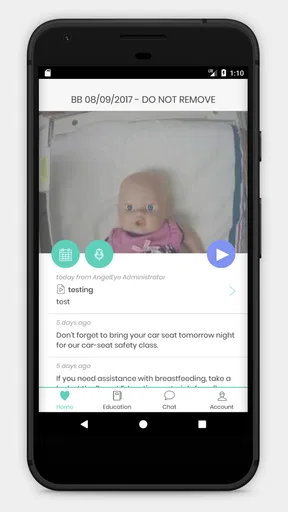
- Quick access to live video from connected Angel Eye systems.
- Helps families stay informed during a loved one’s hospital stay.
- Simple interface makes checking camera feeds straightforward.
- Useful notifications can provide timely updates when enabled.
- Supports remote reassurance without requiring frequent bedside visits.
Cons
- Requires an active Angel Eye hospital system to function.
- Video quality depends heavily on the facility’s network connection.
- Access may be limited by hospital policies and patient permissions.
- Notifications can be delayed or missed due to device settings.
- Privacy concerns may arise when viewing sensitive hospital-room footage.
FAQs for Angel Eye Mobile
What is Angel Eye Mobile used for?
Angel Eye Mobile is designed to help authorized parents and family members stay connected with a hospitalized newborn through a secure video and communication platform. Depending on the hospital’s setup, users may be able to view a live camera feed, receive updates, and communicate with care teams. Access is normally provided through a participating hospital rather than through unrestricted public registration.
Can anyone download and use Angel Eye Mobile?
The application may be available for download on Android and iOS, but downloading it does not automatically provide access to its features. Angel Eye Mobile generally requires an invitation, activation code, or account created through a hospital using the Angel Eye system. Before installing it, confirm that your hospital participates and ask staff how your account will be activated and which features are available to your family.
Is Angel Eye Mobile safe and private?
Angel Eye Mobile is intended for private hospital-family communication, so access is usually protected by account credentials or an invitation issued by the care facility. However, users should still protect their login details, avoid sharing screenshots or access codes, and use a secure internet connection. Privacy policies and data handling may vary according to the hospital and region, so review the app’s permissions and official terms before use.
Does Angel Eye Mobile provide medical advice or replace hospital visits?
No. Angel Eye Mobile is a communication and viewing tool, not a diagnostic or emergency medical service. Camera images and messages should not be interpreted as a complete picture of a baby’s condition, and the application should never replace conversations with doctors or nurses. If you have an urgent concern, contact the hospital directly or follow the emergency instructions provided by the medical team.
What should I do if the video feed, login, or notifications do not work?
First, check that your device has a reliable internet connection, the application is updated, and notifications and camera-related permissions are enabled where required. Closing and reopening the app or resetting your password may solve minor problems. If access still fails, contact the participating hospital or Angel Eye support, because account permissions, camera availability, and technical settings are often controlled by the hospital rather than by the user.


